A look into my life.

Showing posts with label teacher education. Show all posts

Monday, April 23, 2012

Intel Thinking Tools

ABOUT THE TOOLS:
Intel® Education thinking tools are based on research that demonstrates the value of visual representation in constructing and retaining new information.  There are three types of tools; Visual Ranking Tool, Seeing Reason Tool, & Showing Evidence Tool.
  • The Visual Ranking Tool helps students use their higher-order thinking skills to create and compare ordered lists.  Students identify and refine criteria as they assign order to a list and they must explain their reasoning, using a visual diagram.

  • The Seeing Reason Toolallows students to use higher-order thinking skills to analyze cause and effect.   Students create visual maps of the factors in a cause-and-effect investigation.  The maps created make thinking visible.

  • The Showing Evidence Tool has students use higher-order thinking skills when they learn to critically construct, evaluate, and defend their arguments.  Students learn how to construct good arguments and prove their case with credible evidence using visual framework to: make claims, identify evidence, evaluate the quality of that evidence, explain how the evidence supports or weakens claims, and reach conclusions based on the evidence.
 
SET UP ACCOUNT:
This picture shows what  it looks like when you are signed into an educator account.


DESCRIBE PROJECT:
When it comes to most math classes, students always ask the question,” Why do I need to know this?”  I decided to make up a project that will help explain the importance of math.  The plan is to help students analyze the processes used in making important decisions and how significant decisions affect the future. After exploring and collecting data on the benefits of math classes, students reevaluate their own choices for math classes.

Students will use the Seeing Reason Tool to create a map that represents this investigation and answer questions that require data that shows the effects of taking math courses.  This plan would have to range over a week or so incorporating: correlations, graphing, functions, scatter plots, line of best fit, statistics and various higher-order thinking skills: prediction, data analysis, synthesis, evaluation.  One CSO this would cover would be: M.O.8.2.10 - identify a real life problem involving change over time; make a hypothesis as to the outcome; develop, justify, and implement a method to collect, organize, and analyze data; generalize the results to make a conclusion; compare the hypothesis and the results of the investigation; present the project using words, graphs, drawings, models, or tables.
 
Educator's View of Current Project


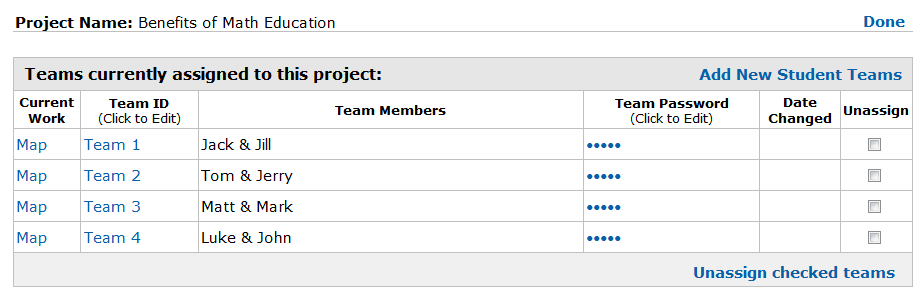
Educator's View of Teams on current project.


Educator's View of Student's Work.


Actual Mapping made ny Educator and Student's.


WHY TOOL WAS CHOSEN:
With the Seeing Reason Tool students can create visual maps of the factors and relationships in a cause-and-effect investigation. These maps make thinking visible and promote collaboration as students work together to refine their understanding.  The tool supports cycles of investigation where students gather what they know, organize that knowledge into a map, and then investigate whether their initial concepts are supported by evidence. 

The Seeing Reason Tool is useful at several points during an investigation—at the beginning when initial ideas about a problem are conceived, during research phases as knowledge and insight grow, and finally, as a presentation of students' fullest understanding of the problem. For this lesson, the student will use it to create a pre-data map of what they think and then go back and edit their map, during and at the end, to include what evidence they found through analyzing their collected data.


CK & PCK:
The Mishra & Koehler (2006) article states that, “Pedagogical content knowledge includes knowing what teaching approaches fit the content, and likewise, knowing how the elements of the content can be arranged for better teaching” (pp. 1027). PCK is concerned with the representation and formulation of concepts, pedagogical techniques, as well as knowledge of what makes concepts difficult or easy to learn, student’s prior knowledge, and theories of epistemology.

Content knowledge is knowledge about the actual subject matter that is to be learned or taught.  CK includes knowledge of concepts, theories, ideas, organizational framework, knowledge of evidence and proof, as well as established practices and approaches towards developing such knowledge (Koehler & Mishra, 2008, pp.13).

This activity intersects with content knowledge (CK) and pedagogical content knowledge (PCK).  The CK here is based on a WV CSO that states what concept and knowledge is to be taught by the teacher and learned by the students.  CK doesn’t work alone, PCK is also involved.  PCK is knowledge about how to make a subject understandable to learners, and in this activity the way that the activity is explained and arranged is for ease of use for students and was designed to help students build off their prior knowledge and use higher order thinking skills to obtain more content knowledge according to the CSO.   
 

HIGHER ORDER THINKING SKILLS:
This activity accommodates the development of student’s higher order thinking skills.  When it comes to higher order thinking skill, “an underlying idea is that some types of learning require more cognitive processing than others. Higher order thinking involves the learning of complex judgmental skills such as critical thinking and problem solving and is more difficult to learn or teach but also more valuable because such skills are more likely to be useable in everyday situations” Higher Order Thinking, 2010). The various higher-order thinking skills that can be seen within this activity are prediction, data analysis, synthesis, and evaluation.  Thinking skills can be improved by understanding the processes involved in thinking. We do not teach children to think, but we can help children to organize their thinking to facilitate more complex reasoning.

There are many ways to foster higher order thinking in the classroom such as including some of the following into the class room environment: multi-level materials, flexible grouping, accepting and celebrating diversity, print-rich environment, high expectations, teacher is seen as co-learner, and nurturing risk-taking.  Also, having students participate in the following kinds of activities: cooperative group activities in which students can communicate with others in a variety of ways, problem-solving activities that require more than routine calculations, open-ended activities with more than one "right" answer, activities which accommodate multiple intelligences, and activities in which both genders participate freely (Higher Order Thinking, 2010). 

This activity allows students work in a group setting and there are high expectations associated with this activity, also risk taking is nurtured and encouraged.  Students get to complete a problem solving activity and communicate with others in a variety of ways.  Also, since the activity is open-ended they are free to choose what they want to research within the boundaries and there is more than one “right” answer. More specifically, students will think about and talk about their learning, negotiate the meaning of their symbols and make their ideas public, translate from one form of knowledge to another, transfer their knowledge to other cause-and-effect situations, and gain experience in using tools for problem solving.
 

REFERENCES:

Higher Order Thinking - WikEd. (n.d.). WikEd. Retrieved April 23, 2012, from http://wik.ed.uiuc.edu/index.php/Higher_Order_Thinking

Koehler, M. J., & Mishra, P. (2008). Introducing Technological Pedagogical Knowledge. In AACTE (Eds.). The Handbook of Technological Pedagogical Content Knowledge for Educators. To be published by AACTE and Lawrence Erlbaum Associates.

Mishra, P., & Koehler, M. J. (2006). Technological Pedagogical Content Knowledge: A new framework for teacher knowledge. Teachers College Record. 108(6), 1017-1054.

 ISTE NETS T - Standard1 (b) &(c), Standard 2 (a), & Standard 3 (d): This assigment covers various standards as it was multi dimensional. Performing the activity designed for this assigmnet would allow students to explore real world issues and solve problems using a digital tool. In explaining and setting the tool up with them the educator would be promoting student reflection using collaborative tools and incorporating digital toosl and resources that promote student learning and creativity. Also, the educator would be modeling effective use of the tool to locate, analyze, evaulate, and use resources.
1. Facilitate and Inspire Student Learning and Creativity,
b. Engage students in exploring real-world issues and solving authentic problems using digital tools and resources c. Promote student reflection using collaborative tools to reveal and clarify students’ conceptual understanding and thinking, planning, and creative processes
2. Design and Develop Digital Age Learning Experiences and Assessments
a. Design or adapt relevant learning experiences that incorporate digital tools and resources to promote student learning and creativity
3. Model Digital Age Work and Learning
d. Model and facilitate effective use of current and emerging digital tools to locate, analyze, evaluate, and use information resources to support research and learning

Tuesday, April 10, 2012

Voice Thread

With VoiceThread, group conversations are collected and shared in one place from anywhere in the world. A VoiceThread is a collaborative, multimedia slide show that holds images, documents, and videos and allows people to navigate slides and leave comments in 5 ways - using voice (with a mic or telephone), text, audio file, or video (via a webcam). 
One cool thing about this is that you can Share a VoiceThread with friends, students, and colleagues for them to record comments also.Users can doodle while commenting, use multiple identities, and pick which comments are shown through moderation. VoiceThreads can even be embedded to show and receive comments on other websites andexported to MP3 players or DVDs to play as archival movies.

I actually downloaded a Mobile App to my iPad for VoiceThread, now I can read and listen and create from my iPad! :)


Here I left a text comment on Richard Pierce's VoiceThread about Generations and Internet.


And here is a Voice Thread that I created for a future math class.  The benefits of using Voice Thread is that it allows students some creativity and keeps them interested.  How neat is it to be able to see and hear your comments and your fellow students comments on certain topics and problems.  They can learn from each other this way.  One barrier is that some students may be shy and may not want to leave a voice comment, but they can easily leave a text comment instead.  It may be difficult to grade an assigment like this, as there will be various forms of answers, but one way is making it participation points and adding it to a test or something.  It would be a good way to review things so that students can see other students ways of working out problems and such.  I think it is really neat and would like to incorporate it into my future classroom. 


ISTE NETS T standards:  This activity relates to the standards by understanding and developing resources created and effectively used in the classroom.  I used power point to create images to be used in a voice thread that could be used to view and check student achievement.  The standards imply that teachers much "demonstrate fluency in technology systems and the transfer of current knowledge to new technologies and situations," which is clearly shown in this tool.  This is a new technology that students find interesting and captivating and I can prove my fluency and share knowledge with my students this way.

Tuesday, March 27, 2012

Self-Grading Forms

We were asked to create a form that is self grading.  I also found a blog that gives you more directions in making a self- grading form:  Self-grading multiple-choice tests with Google Docs  I found this bloggers directions to be very helpful and easy to follow.
Here is my form: Math Quiz


Here is my spreadsheet: Math Quiz Spreadsheet/Grades


How neat is it that you can create a quiz that grades itself for you?  I thought that making a survey was cool.  I used Google Docs to create a Form that was self-grading.  I made it a 5 question math quiz similar to what questions one would find on the ACT. 

Just like when I made the survey, you are able to add themes to your self-grading quiz in order to make it more visibly appealing to those who are taking it.  Help text is also an option to make it easier for your participants to answer your questions. 

Once you have a form/quiz made, you can share it with the public or if you’d rather you could share it with your choice of people.  I chose to share mine with the public.  When I clicked Share on Google Docs I made it open to the public so that you didn’t have to be a Google Docs user or logged into your Google account to fill it out.  I shared it with my Google circle, emailed it to a few students in my class, and posted the link on Facebook in order to get a good number of responses.
Here’s the cool part.  Once a student submits their responses, you can write a formula in the spreadsheet that will grade their answers for you and even give you a percentage!  See my spreadsheet (above) for grading examples.

I went above and beyond on this due to all of the excited participants who were eager to learn. You have the option of changing the message people receive after completing the quiz. Well, I made a Google Docs Presentation containing the answer and the work to get the answers, so that people can see how they did. This will be useful when I use this with my 7th & 8th grade classes that I am observing with because after they take the quiz we can go over it together as a class with a Slideshow presentation.


ISTE NETS T - Standard 1 & 2- Standard 1. During this activity, students are expected to complete an assignment using digital tools, technology system and media (Google Forms). Students are expected to be active in their own learning and understanding of the content. Digital communication aides in the advancement of resources and support. Standard 2. Design and Develop Digital-Age Learning Experiences and Assessments. This assignment was to design and develop an assessment digitally.

Monday, March 26, 2012

Google Forms

We were asked to make a Google form.   I decided to make mine about math, since that is what I got my undergrad in.  My form is about your math background.  I made it to learn more about people’s math background and past math experiences. 


Google forms is actually a pretty neat tool.  You can create online quizzes, surveys, or any type of questionnaire you want.  There are many different question types you can use that all send data straight into a useable spreadsheet.  With these answers you could even do statistical analysis testing to determine various outcomes.

You are also able to add themes to your survey/questionnaire in order to make it more visibly appealing to those who are taking it.  Help text is also an option to make it easier for your participants to answer your questions. 
Once you have a form made, you can share it with the public or if you’d rather you could share it with your choice of people.  I chose to chare mine with the public.  When I clicked Share on Google Docs I made it open to the public so that you didn’t have to be a Google Docs user or logged into your Google account to fill it out.  I shared it with my Google circle, emailed it to a few students in my class, and posted the link on Facebook in order to get a good number of people to take it. 

Forms and surveys like this could be used in professional life.  Being a teacher you could use this for qualitative and quantitative research data collecting.  There are various types of questions and all give you various outputs of data that can be manipulated and used.  You can view the form as embedded into another website or by clicking a hyperlink on a webpage or in an email.  There are various views including; the Live Form, the spreadsheet, and the summary of the results.  The form is basically a nice mask for the spreadsheet.  You could ask people to fill in their answers on a spreadsheet to use later or you could give them a visually appealing and better explained Google Form so that it is easier on them and you end up with the data organized into a spreadsheet for you.  Like I said earlier, there are many ways to share the survey.  You can publish it to public on Google, you can email it to whomever you please, you can embed it into a website, or even hyperlink it into a website.  The results can be viewed upon competition of the survey in a summary of the results or you can view them in spreadsheet format. 

 ISTE NETS T - Standard 1 & 2- Standard 1. During this activity, students are expected to complete an assignment using digital tools, technology system and media (Google Forms). Students are expected to be active in their own learning and understanding of the content. Digital communication aides in the advancement of resources and support. Standard 2. Design and Develop Digital-Age Learning Experiences and Assessments. This assignment was to design and develop an assessment/survey digitally. 

Saturday, February 18, 2012

Jing Video

I used "Jing" to capture a video of How to Set up a Second Blog Attached to an Already Existing Blogspot Blog Account.   I choose to do something fairly simple for anyone who already has a blogspot account, but it shows that I know how to use "Jing" to create a "Jing video."  I had to have two blogs – one for this class and one for observing as a FSU Teacher Candidate.  So, I figured why not teach others in case they, too, have to have two blogs.

Unable to display content. Adobe Flash is required.

With "Jing" video you can create a digital movie without a digital camera.  By clicking on the first prong of the sun you can determine what part of your screen you would like to capture and you can choose the video option instead of the picture option.  (The other two prongs on the sun are for your "Jing" history and “More”-which is where you can find out more about "Jing" and your settings. Once you have captured the video that you were trying to capture you can either save it to your computer or you can share it to screencast.com and it will become a URL.  It can also be found later in your "Jing" history where you can save or share it again later.  The address to your screen capture, if saved, on your computer where be where ever you saved it and whatever you titled it with a “.swf” (shockwave flash object) as its file type.
 ISTE NETS T - Standard 1.  Facilitate and Inspire Student Learning and Creativity.  By using the "Jing" video feature to teach students, colleges, and/or parents how to complete a task, we are using knowledge of a subject matter to enhance and use technology. We are offering support by implementing and step-by-step process that could be used in a real world setting.